How it works
From data to data insights in four steps
You don't need a data analyst or expensive BI tools. Just the file or query you already have — we'll take care of the rest together.
1
You upload an export or query
CSV, Excel, SQL, or DAX — exactly as it comes out of your system.
- We load the data, standardize number and date formats, and detect the type of each column.
- We handle the usual mess too — empty rows, merged headers, or unusual decimal formatting.
- Files stay in your account, separate from other users.
2
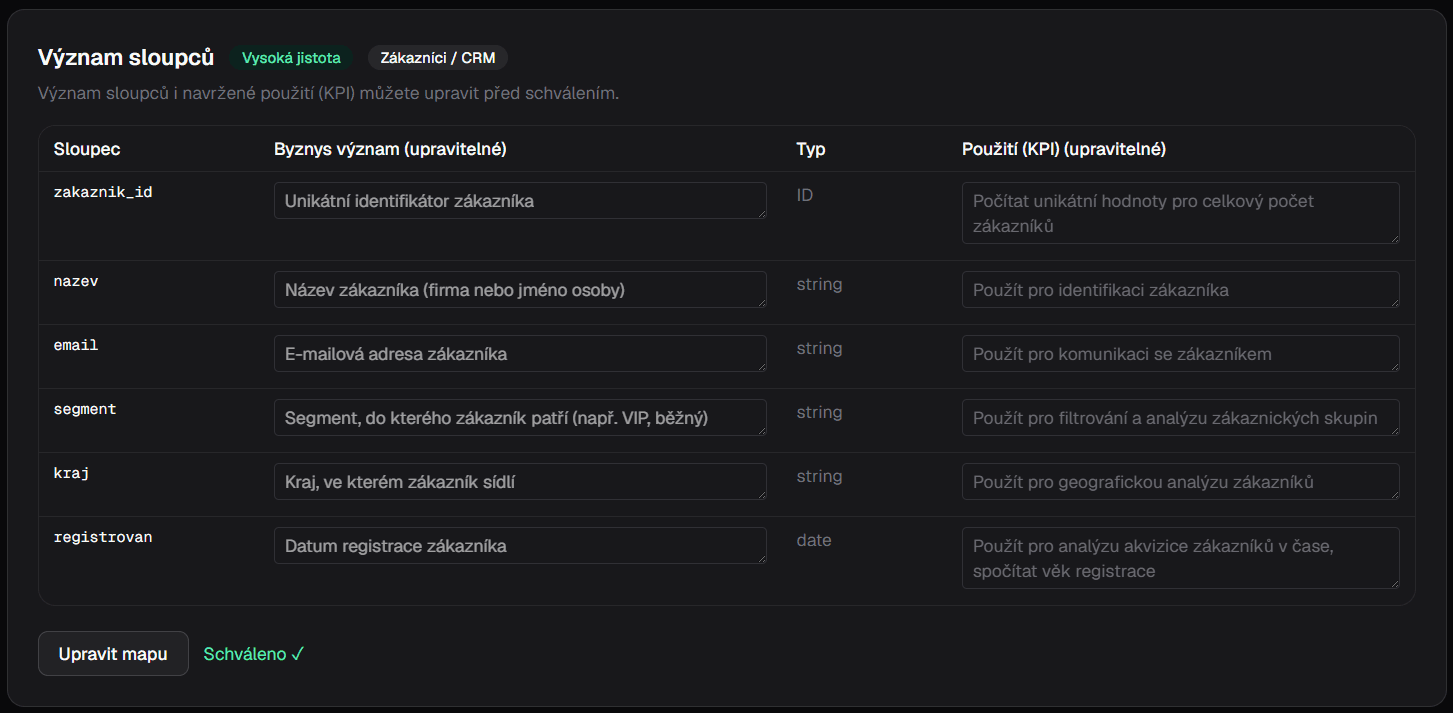
You review what the columns mean
A semantic map translates technical column names into business language.
- The column „obj_dt_cr“ becomes „order creation date“ — and you confirm or correct it with one click.
- This step is key: it's how AI knows what each value means, so you don't have to explain it with every question.
- We remember the approved map, so the next export of the same type skips straight ahead.
3
You get data insights
From data AI now understands, a live company context emerges — and from it, a report, KPIs, and interactive charts.
- Download the context as Markdown and hand it to your own AI agents — they know what the data means, no guesswork.
- The report summarizes what's happening in your data — trends, deviations from the norm, and concrete recommendations.
- The dashboard assembles charts that relate to each other, letting you drill from overview down to detail.
4
You keep asking in your own words
When something occurs to you, just ask — like a colleague, from the same context.
- "How are sales doing this month compared to last year?" You get an answer with a number and a chart.
- For every answer, you can see which source and column the number came from.
- You don't need to know SQL or pivot tables.
Outputs
What you get out of it
One uploaded export or query gets you four things that would otherwise take an afternoon — from AI-readable context to finished reports. Click any of them to see what it looks like.
Try it with your next export or query
We're preparing access for our first users — join the waitlist.